Übung 32
11.11.2021
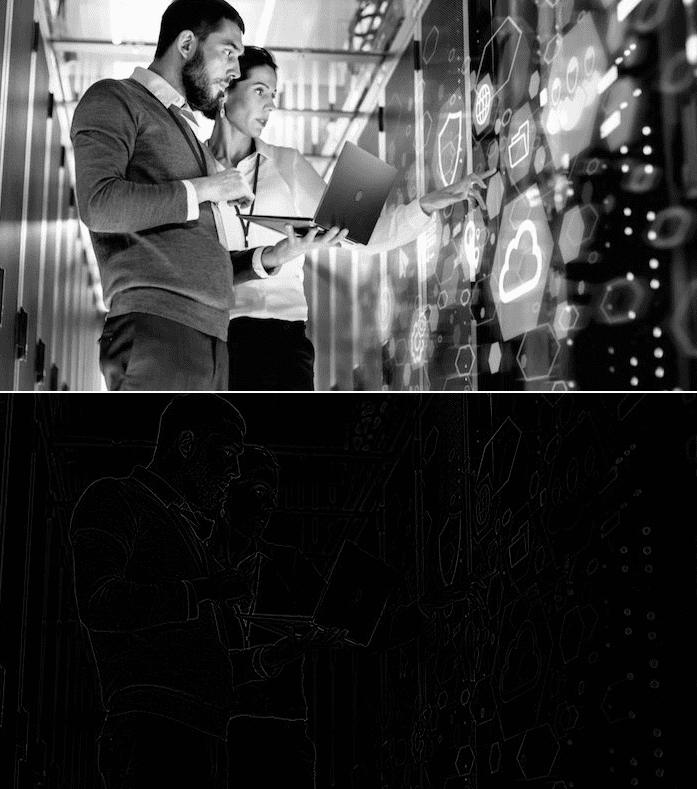
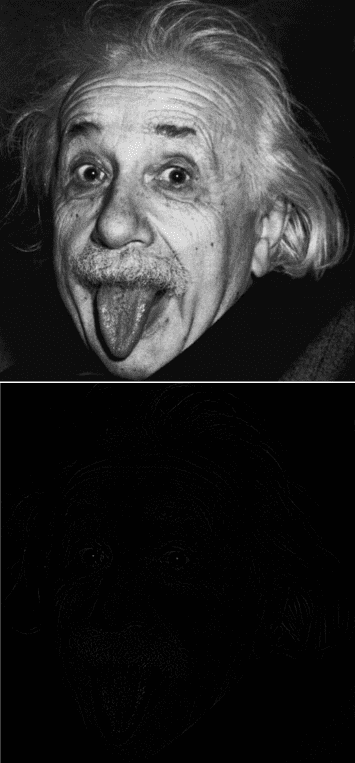
Ändern Sie den P5.js-Sketch für das Gauß-Filter so ab, dass er die unten gezeigte Filtermatrix verwendet. Es handelt sich um die Filtermaske eines Laplace- bzw. “Mexican Hat”-Filters. Testen Sie das Filter mit zwei unbunten RGB-Farbbildern Ihrer Wahl und erläutern Sie, was dieses Filter bewirkt. Zeigen Sie die Quell- und Zielbilder in Ihrem Blog.
let img, edgeImg
// to consider all neighboring pixels we use a 5x5 array
// and normalize these values
// v is the normalized value
let v = 1.0 / 16.0
// kernel is the 5x5 matrix of normalized values
let kernel = [
  [v * 0, v * 0, v * -1, v * 0, v * 0],
  [v * 0, v * -1, v * -2, v * -1, v * 0],
  [v * -1, v * -2, v * 16, v * -2, v * -1],
  [v * 0, v * -1, v * -2, v * -1, v * 0],
  [v * 0, v * 0, v * -1, v * 0, v * 0],
]

// preload() runs once, before setup()
// loadImage() needs to occur here instead of setup()
// if loadImage() is called in setup(), the image won't appear
// since noLoop() restricts draw() to execute only once
// (one execution of draw() is not enough time for the image to load),
// preload() makes sure image is loaded before anything else occurs
function preload() {
  // load the original image
  img = loadImage('uebung-31-1.jpg')
}

// setup() runs once after preload
function setup() {
  // create canvas
  createCanvas(img.width, img.height * 2)
  // noLoop() makes draw() run only once, not in a loop
  noLoop()
}

// draw() runs after setup(), normally on a loop
// in this case it runs only once, because of noDraw()
function draw() {
  // place the original image on the upper left corner
  image(img, 0, 0)

  // create a new image, same dimensions as img
  edgeImg = createImage(img.width, img.height)

  // load its pixels
  edgeImg.loadPixels()

  // two for() loops, to iterate in x axis and y axis
  // since the kernel assumes that the pixel
  // has pixels above, under, left, and right
  // we need to skip the first and last column and row
  // x then goes from 1 to width - 1
  // y then goes from 1 to height - 1
  for (let x = 2; x < img.width; x++) {
    for (let y = 2; y < img.height; y++) {
      // kernel sum for the current pixel starts as 0
      let sum = 0

      // kx, ky variables for iterating over the kernel
      // kx, ky have three different values: -1, 0, 1
      for (kx = -2; kx <= 2; kx++) {
        for (ky = -2; ky <= 2; ky++) {
          let xpos = x + kx
          let ypos = y + ky

          // since our image is grayscale,
          // RGB values are identical
          // we retrieve the red value for this example
          // (green and blue work as well)
          let val = red(img.get(xpos, ypos))

          // accumulate the  kernel sum
          // kernel is a 5x5 matrix
          // kx and ky have values -2, -1, 0, 1, 2
          // if we add 1 to kx and ky, we get 0, 1, 2, 3, 4
          // with that we can use it to iterate over kernel
          // and calculate the accumulated sum
          sum += kernel[kx + 2][ky + 2] * val
        }
      }

      // set the value of the edgeImg pixel to the kernel sum
      edgeImg.set(x, y, color(sum))
    }
  }
  // updatePixels() to write the changes on edgeImg
  edgeImg.updatePixels()

  // draw edgeImg at the right of the original image
  image(edgeImg, 0, img.height)
}
https://editor.p5js.org/ich/sketches/2z_8HDxUs
Der “Mexican Hat”-Filter verändert das Bild so, dass es grundsätzlich schwarz ist. Nur die Kontur-Pixel, also die Pixel, bei denen ein harter Übergang zwischen zwei Farben bzw. Helligkeitswerten stattfindet, werden hell/weiß eingezeichnet.